Feature
Programming Ligatures Fonts
Monospace fonts featuring programming ligatures that combine character sequences into elegant glyphs. Perfect for developers who want more readable code with symbols like arrows and operators.
5 premium | 3 free | 8 total
Programming ligatures transform common code sequences into single, elegant glyphs. When you type =>, !=, or >=, these fonts render them as cohesive symbols, making code more scannable and aesthetically pleasing.
Why Choose Fonts with Ligatures?
Code ligatures reduce visual noise and help developers parse code faster. Operators become distinct symbols rather than combinations of punctuation, improving readability during long coding sessions.
Common Ligatures
- Arrows:
->,=>,<-,<=>,-->,<-- - Comparisons:
!=,!==,==,===,>=,<= - Logical:
&&,||,::,:: - Comments:
//,/*,*/, - Other:
www,***,|||,;;;
Popular Ligature Fonts
Several free fonts offer excellent programming ligatures:
- Fira Code: The most comprehensive ligature set
- JetBrains Mono: Optimized for readability with smart ligatures
- Victor Mono: Combines ligatures with cursive italics
- Cascadia Code: Microsoft's modern coding font
Best Use Cases
Programming ligatures work best in:
- Code editors and IDEs
- Terminal emulators
- Documentation code blocks
- Coding tutorials and presentations
- Technical writing
Considerations
Some developers prefer to disable ligatures for certain contexts, as they can affect character counting and cursor positioning. Most editors allow per-font or per-context ligature settings.
Premium Programming Ligatures Fonts
Free Programming Ligatures Fonts
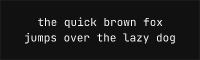
JetBrains Mono Free Variable
Google Fonts OFL-1.1 Variable (100-900)
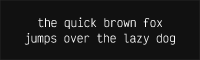
Victor Mono Free Variable
Google Fonts OFL-1.1 Variable (100-900)
No fonts found with this filter.