Exo
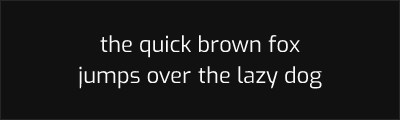
About Exo
- Source
- Google Fonts ↗
- Classification
- sans-serif
- Weights
- Variable (100-900)
- Features
- Variable, Italics
Exo is a geometric sans-serif typeface designed by Natanael Gama and released through Google Fonts. Originally launched in 2012 and extensively revised as Exo 2 in 2014, the typeface offers a contemporary take on industrial geometric design with excellent versatility for both display and text applications.
History and Design
Natanael Gama designed Exo as a futuristic geometric sans-serif that combines technological precision with contemporary aesthetics. The Exo 2 revision refined the original design with improved letterforms, enhanced spacing, and added a complete italic family. The design features consistent stroke widths, geometric foundations, and subtle refinements for text readability.
Why Exo is Popular
Exo's industrial aesthetic makes it popular for technology, gaming, and automotive projects where a technical, futuristic feel is desired. The extensive weight range and variable font support provide flexibility for complex typographic hierarchies. Its free availability under the Open Font License makes it accessible for projects of all scales.
Technical Features
- Variable font: Continuous weight axis from Thin (100) to Black (900)
- Complete italic family: All weights include true italics
- Wide language support: Latin, Cyrillic, and Vietnamese character sets
- OpenType features: Tabular figures, stylistic alternates, and more
Best Use Cases
Exo excels in:
- Technology branding: Futuristic aesthetic for tech companies
- Gaming: Modern feel for game interfaces and marketing
- Automotive: Industrial precision for vehicle-related design
- Signage: Clear letterforms for wayfinding systems
Usage Tips
For body text, use weights 400-500 for optimal readability. For headlines and display, weights 600-900 create strong visual impact. Exo pairs well with neutral body fonts like Roboto or Open Sans for contrast between display and text applications.
Alternative For (1)
Exo is a free alternative to the following premium fonts:
Shares industrial geometric character with similar technical aesthetic
How to Use Exo
Copy these code snippets to quickly add Exo to your project.
CSS Import
@import url('https://fonts.googleapis.com/css2?family=Exo:wght@100..900&display=swap');HTML Link Tags
<link rel="preconnect" href="https://fonts.googleapis.com">
<link rel="preconnect" href="https://fonts.gstatic.com" crossorigin>
<link href="https://fonts.googleapis.com/css2?family=Exo:wght@100..900&display=swap" rel="stylesheet">
Tailwind CSS
// tailwind.config.js
module.exports = {
  theme: {
    extend: {
      fontFamily: {
        'exo': ['Exo', 'sans-serif'],
      },
    },
  },
}

// Usage in HTML:
// <p class="font-exo">Your text here</p>
React / Next.js
// Using next/font (Next.js 13+)
import { Exo } from 'next/font/google';

const exo = Exo({
  subsets: ['latin'],
  weight: ['100', '200', '300', '400', '500', '600', '700', '800', '900'],
});

export default function Component() {
  return (
    <p className={exo.className}>
      Your text here
    </p>
  );
}

// Or using inline styles with Google Fonts link:
// <p style={{ fontFamily: "'Exo'" }}>Your text</p>