Fira Mono
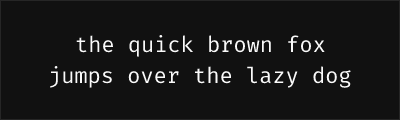
About Fira Mono
- Source
- Google Fonts ↗
- Classification
- mono
- Weights
- 400, 500, 700
- Features
- Standard
Fira Mono is a free monospace font designed by Carrois Apostrophe for Mozilla, created as part of the Firefox OS visual identity. It serves as the foundation for the popular Fira Code, but without programming ligatures.
History and Design
Mozilla commissioned Fira Mono (along with Fira Sans) for Firefox OS, their mobile operating system project. The font was designed by Ralph du Carrois and incorporates the same clean, modern aesthetic that defines the Fira family. When Firefox OS was discontinued, the fonts remained as valuable open-source resources.
Why Fira Mono is Reliable
Fira Mono offers straightforward excellence for coding:
- Mozilla pedigree: Professional design for a major platform
- Clean simplicity: No ligatures means pure character display
- Fira family: Pairs perfectly with Fira Sans
- Proven foundation: The basis for Fira Code's success
- Broad support: Works reliably everywhere
Technical Features
- Weights available: Regular (400), Medium (500), Bold (700)
- No ligatures: Characters render individually
- Character distinction: Clear separation of similar glyphs
- Language support: Full Latin, Cyrillic, Greek coverage
- Consistent metrics: Identical spacing to Fira Sans Mono
Best Use Cases
Fira Mono excels in:
- Terminal applications: Clean, straightforward rendering
- Environments without ligature support: Universal compatibility
- Legacy editors: Works in any code editor
- Web development: Easy to embed, reliable rendering
Usage Tips
If you want the same font with ligatures, use Fira Code instead. For ligature-free coding, Fira Mono at weight 400 provides excellent readability. Medium (500) works well for presentations. Bold (700) for emphasis in documentation. Pair with Fira Sans for UI elements to maintain the Mozilla aesthetic.
Alternative For (3)
Fira Mono is a free alternative to the following premium fonts:
Mozilla's clean monospace without ligatures for straightforward code display
How to Use Fira Mono
Copy these code snippets to quickly add Fira Mono to your project.
CSS Import
@import url('https://fonts.googleapis.com/css2?family=Fira+Mono:wght@400;500;700&display=swap');HTML Link Tags
<link rel="preconnect" href="https://fonts.googleapis.com">
<link rel="preconnect" href="https://fonts.gstatic.com" crossorigin>
<link href="https://fonts.googleapis.com/css2?family=Fira+Mono:wght@400;500;700&display=swap" rel="stylesheet">
Tailwind CSS
// tailwind.config.js
module.exports = {
  theme: {
    extend: {
      fontFamily: {
        'fira-mono': ['"Fira Mono"', 'sans-serif'],
      },
    },
  },
}

// Usage in HTML:
// <p class="font-fira-mono">Your text here</p>
React / Next.js
// Using next/font (Next.js 13+)
import { Fira_Mono } from 'next/font/google';

const fira_mono = Fira_Mono({
  subsets: ['latin'],
  weight: ['400', '500', '700'],
});

export default function Component() {
  return (
    <p className={fira_mono.className}>
      Your text here
    </p>
  );
}

// Or using inline styles with Google Fonts link:
// <p style={{ fontFamily: '"Fira Mono"' }}>Your text</p>