JetBrains Mono
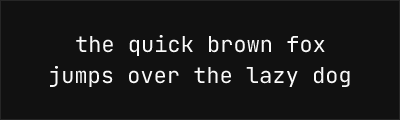
About JetBrains Mono
- Source
- Google Fonts ↗
- Classification
- mono
- Weights
- Variable (100-900)
- Features
- Variable, Italics
JetBrains Mono is a free and open-source typeface designed specifically for developers by JetBrains, the company behind IntelliJ IDEA, WebStorm, and other popular development tools. Released in 2020, it has rapidly become one of the most popular coding fonts available.
History and Design
JetBrains developed this font in-house to provide their IDE users with an optimal coding experience. The design focuses on the unique demands of reading code: increased height of lowercase letters for better readability, distinctive letterforms to avoid confusion between similar characters, and programming ligatures that make operators easier to parse at a glance.
Why JetBrains Mono is Exceptional
JetBrains Mono has set a new standard for free coding fonts:
- Developer-focused design: Every aspect optimized for code readability
- Programming ligatures: 139 code ligatures for cleaner operator display
- Increased x-height: 1.32 makes lowercase letters more readable
- Variable font support: Continuous weight adjustment from Thin to ExtraBold
- Extensive character set: Full Latin, Cyrillic, and Greek support
Technical Features
- Weight range: 100-800 (Variable font with continuous range)
- Ligature support: Extensive set including =>, ->, ===, !==, >=, <=
- Character distinction: Clear differentiation between 0/O, 1/l/I
- Low contrast: Reduced stroke contrast for screen optimization
- Tall x-height: Enhanced readability at small sizes
Best Use Cases
JetBrains Mono excels in:
- IDE and code editors: The primary intended use case
- Terminal applications: Excellent rendering in command-line environments
- Documentation: Code samples and technical writing
- Cross-platform development: Consistent appearance everywhere
Usage Tips
Enable ligatures in your editor settings to take full advantage of JetBrains Mono's design. Use weight 400 for body code and 600-700 for emphasis. For presentations or streaming, consider weight 500 for improved visibility. Pair with Inter or IBM Plex Sans for complementary UI text.
Alternative For (5)
JetBrains Mono is a free alternative to the following premium fonts:
Excellent free alternative with programming ligatures and similar proportions
Excellent free coding font with good italics, though less distinctive
Modern coding font with excellent legibility and programming ligatures
How to Use JetBrains Mono
Copy these code snippets to quickly add JetBrains Mono to your project.
CSS Import
@import url('https://fonts.googleapis.com/css2?family=JetBrains+Mono:wght@100..900&display=swap');HTML Link Tags
<link rel="preconnect" href="https://fonts.googleapis.com">
<link rel="preconnect" href="https://fonts.gstatic.com" crossorigin>
<link href="https://fonts.googleapis.com/css2?family=JetBrains+Mono:wght@100..900&display=swap" rel="stylesheet">
Tailwind CSS
// tailwind.config.js
module.exports = {
  theme: {
    extend: {
      fontFamily: {
        'jetbrains-mono': ['"JetBrains Mono"', 'sans-serif'],
      },
    },
  },
}

// Usage in HTML:
// <p class="font-jetbrains-mono">Your text here</p>
React / Next.js
// Using next/font (Next.js 13+)
import { JetBrains_Mono } from 'next/font/google';

const jetbrains_mono = JetBrains_Mono({
  subsets: ['latin'],
  weight: ['100', '200', '300', '400', '500', '600', '700', '800', '900'],
});

export default function Component() {
  return (
    <p className={jetbrains_mono.className}>
      Your text here
    </p>
  );
}

// Or using inline styles with Google Fonts link:
// <p style={{ fontFamily: '"JetBrains Mono"' }}>Your text</p>