Josefin Sans
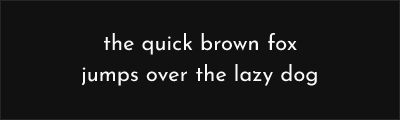
About Josefin Sans
- Source
- Google Fonts ↗
- Classification
- display
- Weights
- Variable (100-900)
- Features
- Variable, Italics
Josefin Sans is an elegant geometric sans-serif typeface designed by Santiago Orozco for Google Fonts. Released in 2010, it features a high x-height and distinctive geometric construction influenced by 1920s art deco typography, making it an excellent free alternative to ITC Avant Garde Gothic and similar elegant geometric display faces.
History and Design
Santiago Orozco drew inspiration from 1920s geometric typefaces when designing Josefin Sans. The design captures the elegance of that era—clean geometric forms, high x-height, and sophisticated proportions—while maintaining contemporary legibility and web optimization.
The typeface's name references the Josephine typeface from 1930, acknowledging its vintage influences while establishing its own identity. Orozco refined the design to work effectively across sizes, from small text to large headlines.
Technical Features
- Variable font: Continuous weight axis from Thin to Bold
- Seven weights: Complete range for versatile typesetting
- True italics: Distinct italic designs, not obliques
- Extended Latin: Comprehensive character coverage
- Web optimized: Excellent screen rendering
Why Josefin Sans Excels
Josefin Sans succeeds by bringing vintage elegance to contemporary design. Its high x-height ensures readability at small sizes, while its geometric construction provides the visual sophistication typically associated with premium display typefaces. The complete weight range offers flexibility from delicate thin weights to confident bold.
Best Use Cases
Josefin Sans excels in:
- Fashion and lifestyle: Editorial and branding
- High-end retail: Sophisticated product presentation
- Wedding and events: Elegant invitations and materials
- Display headlines: Art-directed title treatments
Usage Tips
Josefin Sans performs best at medium to large sizes where its elegant details are visible. The Thin weight requires generous sizing for legibility. Pair with complementary serifs like Cormorant Garamond or Libre Baskerville for classic contrast. The variable font version enables subtle weight adjustments for precise typography. Consider increased letter-spacing for all-caps settings to enhance the geometric aesthetic.
Alternative For (2)
Josefin Sans is a free alternative to the following premium fonts:
Elegant geometric sans with art deco influences and wide range of weights
Art deco influenced geometric sans with elegant display proportions
How to Use Josefin Sans
Copy these code snippets to quickly add Josefin Sans to your project.
CSS Import
@import url('https://fonts.googleapis.com/css2?family=Josefin+Sans:wght@100..900&display=swap');HTML Link Tags
<link rel="preconnect" href="https://fonts.googleapis.com">
<link rel="preconnect" href="https://fonts.gstatic.com" crossorigin>
<link href="https://fonts.googleapis.com/css2?family=Josefin+Sans:wght@100..900&display=swap" rel="stylesheet">
Tailwind CSS
// tailwind.config.js
module.exports = {
  theme: {
    extend: {
      fontFamily: {
        'josefin-sans': ['"Josefin Sans"', 'sans-serif'],
      },
    },
  },
}

// Usage in HTML:
// <p class="font-josefin-sans">Your text here</p>
React / Next.js
// Using next/font (Next.js 13+)
import { Josefin_Sans } from 'next/font/google';

const josefin_sans = Josefin_Sans({
  subsets: ['latin'],
  weight: ['100', '200', '300', '400', '500', '600', '700', '800', '900'],
});

export default function Component() {
  return (
    <p className={josefin_sans.className}>
      Your text here
    </p>
  );
}

// Or using inline styles with Google Fonts link:
// <p style={{ fontFamily: '"Josefin Sans"' }}>Your text</p>