Lato
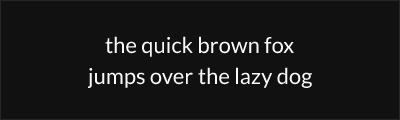
About Lato
- Source
- Google Fonts ↗
- Classification
- sans-serif
- Weights
- 100, 300, 400, 700, 900
- Features
- Italics
Lato is a humanist sans-serif typeface designed by Warsaw-based designer Łukasz Dziedzic. Originally commissioned for a corporate client, it was later released as an open-source font and has become one of the most popular typefaces on Google Fonts.
History and Design
Łukasz Dziedzic began designing Lato (Polish for "Summer") in 2010 for a large corporate client. When the client chose a different direction, Dziedzic decided to release the typeface publicly. The design balances classical proportions with contemporary details—letterforms appear somewhat serious in body text but reveal warm, friendly curves at larger sizes.
This duality reflects Dziedzic's goal of creating a font that could transition seamlessly from professional documents to more expressive display use.
Why Lato Endures
Lato's unique ability to feel neutral in body text while showing character at display sizes has made it enormously popular. Its humanist touches—particularly in the semi-rounded details of letters like 'a', 'e', and 'g'—give it warmth without compromising professionalism. The font works equally well for startups and established corporations.
Technical Features
- 5 weights: Thin, Light, Regular, Bold, and Black
- True italics: Distinctive italic designs, not slanted romans
- Extended Latin: Support for Central European languages
- Hairline to Black: Wide weight range for versatile typography
- OpenType features: Kerning, fractions, and ligatures
Best Use Cases
Lato excels in:
- Corporate communications: Professional documents and presentations
- Website body text: Excellent readability at paragraph sizes
- Brand identity: Warm yet professional logos and marketing
- Print materials: Reliable choice for brochures and reports
Usage Tips
For body text, Regular (400) weight at 16-18px works beautifully. The Light (300) weight creates elegant headlines when set at larger sizes. Lato's Thin (100) and Black (900) weights are best reserved for display use where their extreme weights can shine. Pair Lato with serif fonts like Merriweather for classic contrast, or use it throughout a design system for a cohesive look.
Alternative For (5)
Lato is a free alternative to the following premium fonts:
Shares the blend of geometric structure with humanist warmth
Humanist proportions with similar warmth and professional character
How to Use Lato
Copy these code snippets to quickly add Lato to your project.
CSS Import
@import url('https://fonts.googleapis.com/css2?family=Lato:wght@100;300;400;700;900&display=swap');HTML Link Tags
<link rel="preconnect" href="https://fonts.googleapis.com">
<link rel="preconnect" href="https://fonts.gstatic.com" crossorigin>
<link href="https://fonts.googleapis.com/css2?family=Lato:wght@100;300;400;700;900&display=swap" rel="stylesheet">
Tailwind CSS
// tailwind.config.js
module.exports = {
  theme: {
    extend: {
      fontFamily: {
        'lato': ['Lato', 'sans-serif'],
      },
    },
  },
}

// Usage in HTML:
// <p class="font-lato">Your text here</p>
React / Next.js
// Using next/font (Next.js 13+)
import { Lato } from 'next/font/google';

const lato = Lato({
  subsets: ['latin'],
  weight: ['100', '300', '400', '700', '900'],
});

export default function Component() {
  return (
    <p className={lato.className}>
      Your text here
    </p>
  );
}

// Or using inline styles with Google Fonts link:
// <p style={{ fontFamily: "'Lato'" }}>Your text</p>