Libre Baskerville
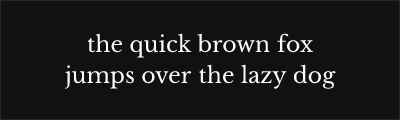
About Libre Baskerville
- Source
- Google Fonts ↗
- Classification
- serif
- Weights
- 400, 700
- Features
- Italics
Libre Baskerville is a web-optimized serif typeface designed by Pablo Impallari based on the American Type Founder's 1941 Baskerville revival. Specifically crafted for excellent screen readability, it captures the transitional elegance of John Baskerville's 18th-century designs.
History and Design
Pablo Impallari designed Libre Baskerville as part of Google Fonts' initiative to provide high-quality open-source alternatives to classic typefaces. Rather than creating a strict historical revival, Impallari optimized the design specifically for digital screens—slightly heavier hairlines and adjusted spacing improve clarity at typical screen resolutions.
The design draws from the 1941 ATF Baskerville, itself a revival of John Baskerville's groundbreaking work. This lineage ensures authentic Baskerville character while accommodating modern reproduction requirements.
Why Libre Baskerville Excels
Libre Baskerville succeeds where many classical revivals struggle: on screen. The careful optimization for digital display means body text remains readable without sacrificing the refined elegance that defines Baskerville. This makes it exceptional for websites, apps, and digital publications.
Technical Features
- Web optimized: Designed specifically for screen readability
- True italics: Distinct italic design, not obliqued roman
- Generous x-height: Improved readability at small sizes
- OpenType features: Ligatures, kerning pairs
- Latin Extended: Comprehensive character support
Best Use Cases
Libre Baskerville excels in:
- Web body text: Long-form articles and blog posts
- Digital publications: E-books and online magazines
- Corporate websites: Professional, trustworthy appearance
- Educational content: Academic websites and course materials
Usage Tips
Libre Baskerville reads comfortably at 16-18px for web body text. Pair with modern sans-serifs like Montserrat or Open Sans for headlines. Use the bold weight sparingly for emphasis—it provides sufficient contrast without overwhelming. The italic is true italic, making it ideal for book titles, emphasis, and pull quotes. Consider slightly increased line height (1.6-1.8) for optimal readability.
Alternative For (1)
Libre Baskerville is a free alternative to the following premium fonts:
Excellent web-optimized revival with improved screen readability
How to Use Libre Baskerville
Copy these code snippets to quickly add Libre Baskerville to your project.
CSS Import
@import url('https://fonts.googleapis.com/css2?family=Libre+Baskerville:wght@400;700&display=swap');HTML Link Tags
<link rel="preconnect" href="https://fonts.googleapis.com">
<link rel="preconnect" href="https://fonts.gstatic.com" crossorigin>
<link href="https://fonts.googleapis.com/css2?family=Libre+Baskerville:wght@400;700&display=swap" rel="stylesheet">
Tailwind CSS
// tailwind.config.js
module.exports = {
  theme: {
    extend: {
      fontFamily: {
        'libre-baskerville': ['"Libre Baskerville"', 'sans-serif'],
      },
    },
  },
}

// Usage in HTML:
// <p class="font-libre-baskerville">Your text here</p>
React / Next.js
// Using next/font (Next.js 13+)
import { Libre_Baskerville } from 'next/font/google';

const libre_baskerville = Libre_Baskerville({
  subsets: ['latin'],
  weight: ['400', '700'],
});

export default function Component() {
  return (
    <p className={libre_baskerville.className}>
      Your text here
    </p>
  );
}

// Or using inline styles with Google Fonts link:
// <p style={{ fontFamily: '"Libre Baskerville"' }}>Your text</p>