Montserrat
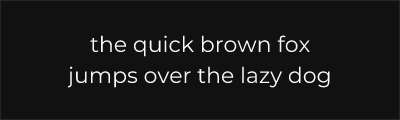
About Montserrat
- Source
- Google Fonts ↗
- Classification
- sans-serif
- Weights
- Variable (100-900)
- Features
- Variable, Italics
Montserrat is a geometric sans-serif typeface designed by Julieta Ulanovsky, inspired by the old posters and signs in the traditional Montserrat neighborhood of Buenos Aires. Released as an open-source project, it has become one of the most popular free alternatives to premium geometric sans-serif fonts.
History and Design
The project began in 2011 when Julieta Ulanovsky started documenting the unique urban typography of Buenos Aires' Montserrat neighborhood. The typeface captures the beauty of early twentieth-century urban lettering while being optimized for modern digital use. In 2017, the family was completely redrawn as a variable font with an extended character set.
Why Montserrat is Popular
Montserrat's geometric forms and extensive weight range make it an excellent substitute for premium fonts like Proxima Nova and Gotham. Its clean, modern aesthetic works well across digital and print media. The variable font version offers fine-tuned control over weight, making it highly versatile for responsive design.
Technical Features
- Variable font: Full weight axis from Thin (100) to Black (900)
- Complete italic family: All weights include true italics
- Extended language support: Latin, Cyrillic, and Vietnamese character sets
- OpenType features: Tabular figures, stylistic alternates, and more
Best Use Cases
Montserrat excels in:
- Headlines and display text: Strong presence at large sizes
- Brand identity: Modern geometric aesthetic for logos and marketing
- Web applications: Excellent screen rendering across all sizes
- UI design: Clear and legible for interface elements
Usage Tips
For body text, use weights 400-500 for optimal readability. For headlines, weights 600-800 provide strong visual impact. Pair Montserrat with serif fonts like Merriweather or Lora for classic contrast in editorial layouts.
Alternative For (3)
Montserrat is a free alternative to the following premium fonts:
Very close geometric proportions, excellent weight range
Very close geometric proportions with similar weight range and bold presence
Comparable geometric structure with slightly more angular forms
How to Use Montserrat
Copy these code snippets to quickly add Montserrat to your project.
CSS Import
@import url('https://fonts.googleapis.com/css2?family=Montserrat:wght@100..900&display=swap');HTML Link Tags
<link rel="preconnect" href="https://fonts.googleapis.com">
<link rel="preconnect" href="https://fonts.gstatic.com" crossorigin>
<link href="https://fonts.googleapis.com/css2?family=Montserrat:wght@100..900&display=swap" rel="stylesheet">
Tailwind CSS
// tailwind.config.js
module.exports = {
  theme: {
    extend: {
      fontFamily: {
        'montserrat': ['Montserrat', 'sans-serif'],
      },
    },
  },
}

// Usage in HTML:
// <p class="font-montserrat">Your text here</p>
React / Next.js
// Using next/font (Next.js 13+)
import { Montserrat } from 'next/font/google';

const montserrat = Montserrat({
  subsets: ['latin'],
  weight: ['100', '200', '300', '400', '500', '600', '700', '800', '900'],
});

export default function Component() {
  return (
    <p className={montserrat.className}>
      Your text here
    </p>
  );
}

// Or using inline styles with Google Fonts link:
// <p style={{ fontFamily: "'Montserrat'" }}>Your text</p>