Open Sans
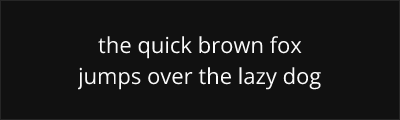
About Open Sans
- Source
- Google Fonts ↗
- Classification
- sans-serif
- Weights
- Variable (100-900)
- Features
- Variable, Italics
Open Sans is a humanist sans-serif typeface designed by Steve Matteson and commissioned by Google. Released in 2011, it quickly became one of the most popular web fonts in the world, known for its excellent legibility across all sizes and platforms.
History and Design
Steve Matteson designed Open Sans with a focus on clarity and neutrality while maintaining the friendly, approachable character of humanist sans-serifs. The design features open letterforms, upright stress, and generous proportions that ensure excellent readability on screens and in print. Google commissioned the typeface as part of their initiative to improve web typography globally.
The extensive language support, including Latin, Greek, and Cyrillic scripts, reflects Google's commitment to making high-quality typography accessible worldwide. The 2020 update introduced a variable font version, allowing designers to access any weight along a continuous spectrum.
Why Open Sans Dominates Web Typography
Open Sans achieved massive adoption because it solves multiple problems simultaneously: it's legible at any size, works on any platform, supports many languages, and maintains a pleasant, professional appearance. Its neutral character makes it versatile enough for corporate communications, consumer applications, and everything in between.
The Apache 2.0 license provides maximum flexibility for commercial use, contributing to its widespread adoption in applications from WordPress themes to enterprise software.
Technical Features
- Variable font: Continuous weight axis from Light to ExtraBold
- True italics: Distinct italic designs for elegant emphasis
- Extended language support: Latin, Cyrillic, Greek, Vietnamese
- Optimized rendering: Excellent hinting for crisp display at all sizes
Best Use Cases
Open Sans excels in:
- Web applications: Reliable cross-platform rendering
- Corporate communications: Professional without being cold
- Multilingual projects: Consistent design across scripts
- Print materials: Versatile for documents, brochures, and signage
Usage Tips
For body text, use weight 400 at 16px or larger. Weight 600 works well for headings without being too heavy. The variable font version offers fine control over weight for custom designs. Open Sans pairs beautifully with Merriweather, Lora, or Source Serif Pro for classic serif/sans-serif combinations.
Alternative For (4)
Open Sans is a free alternative to the following premium fonts:
Comparable humanist proportions designed for digital clarity
Similar screen optimization with comparable x-height and clarity
Comparable neutrality and legibility at small sizes
How to Use Open Sans
Copy these code snippets to quickly add Open Sans to your project.
CSS Import
@import url('https://fonts.googleapis.com/css2?family=Open+Sans:wght@100..900&display=swap');HTML Link Tags
<link rel="preconnect" href="https://fonts.googleapis.com">
<link rel="preconnect" href="https://fonts.gstatic.com" crossorigin>
<link href="https://fonts.googleapis.com/css2?family=Open+Sans:wght@100..900&display=swap" rel="stylesheet">
Tailwind CSS
// tailwind.config.js
module.exports = {
  theme: {
    extend: {
      fontFamily: {
        'open-sans': ['"Open Sans"', 'sans-serif'],
      },
    },
  },
}

// Usage in HTML:
// <p class="font-open-sans">Your text here</p>
React / Next.js
// Using next/font (Next.js 13+)
import { Open_Sans } from 'next/font/google';

const open_sans = Open_Sans({
  subsets: ['latin'],
  weight: ['100', '200', '300', '400', '500', '600', '700', '800', '900'],
});

export default function Component() {
  return (
    <p className={open_sans.className}>
      Your text here
    </p>
  );
}

// Or using inline styles with Google Fonts link:
// <p style={{ fontFamily: '"Open Sans"' }}>Your text</p>