Pacifico
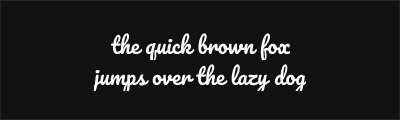
About Pacifico
- Source
- Google Fonts ↗
- Classification
- display
- Weights
- 400
- Features
- Standard
Pacifico is a casual brush script typeface designed by Vernon Adams for Google Fonts. Released in 2011, Pacifico evokes 1950s American surf culture with its flowing, connected letterforms and laid-back personality, making it an excellent free alternative to casual script typefaces like Lobster.
History and Design
Vernon Adams designed Pacifico to capture the spirit of California surf culture—relaxed, friendly, and effortlessly cool. The name itself references the Pacific Ocean, and the letterforms suggest hand-painted signs from beachside shops and diners.
The design features connected brush strokes that flow naturally from letter to letter. Unlike formal scripts, Pacifico embraces casual imperfection—the connections vary naturally, and strokes have organic weight variation that suggests a brush rather than a pen.
Technical Features
- Single weight: Optimized regular weight
- Brush aesthetic: Natural stroke variation
- Connected letters: Flowing script connections
- Cyrillic support: Extended language coverage
- Web optimized: Clean rendering at various sizes
Why Pacifico Excels
Pacifico succeeds by committing fully to its casual personality. It doesn't try to be elegant or formal—it's unabashedly fun and friendly. This clarity of purpose makes it immediately useful for designs requiring warmth and approachability without pretension.
Best Use Cases
Pacifico excels in:
- Food and beverage: Casual dining, ice cream, coffee shops
- Lifestyle brands: Beach, surf, outdoor recreation
- Casual signage: Welcoming, informal messaging
- Social media: Friendly, personality-driven content
Usage Tips
Pacifico works best at display sizes (18px+) where its brush details are visible. Avoid using for extended text—it's designed for headlines, logos, and short phrases. Pair with clean sans-serifs like Open Sans or Lato for supporting text. The casual aesthetic suits lowercase or title case better than all-caps. Consider the context carefully—Pacifico's strong personality may not suit formal or corporate applications.
Alternative For (1)
Pacifico is a free alternative to the following premium fonts:
Casual script with surf-inspired retro aesthetic and excellent readability
How to Use Pacifico
Copy these code snippets to quickly add Pacifico to your project.
CSS Import
@import url('https://fonts.googleapis.com/css2?family=Pacifico:wght@400&display=swap');HTML Link Tags
<link rel="preconnect" href="https://fonts.googleapis.com">
<link rel="preconnect" href="https://fonts.gstatic.com" crossorigin>
<link href="https://fonts.googleapis.com/css2?family=Pacifico:wght@400&display=swap" rel="stylesheet">
Tailwind CSS
// tailwind.config.js
module.exports = {
  theme: {
    extend: {
      fontFamily: {
        'pacifico': ['Pacifico', 'sans-serif'],
      },
    },
  },
}

// Usage in HTML:
// <p class="font-pacifico">Your text here</p>
React / Next.js
// Using next/font (Next.js 13+)
import { Pacifico } from 'next/font/google';

const pacifico = Pacifico({
  subsets: ['latin'],
  weight: ['400'],
});

export default function Component() {
  return (
    <p className={pacifico.className}>
      Your text here
    </p>
  );
}

// Or using inline styles with Google Fonts link:
// <p style={{ fontFamily: "'Pacifico'" }}>Your text</p>