Roboto Slab
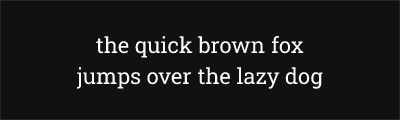
About Roboto Slab
- Source
- Google Fonts ↗
- Classification
- serif
- Weights
- Variable (100-900)
- Features
- Variable
Roboto Slab is a geometric slab serif typeface designed by Christian Robertson as part of the Roboto superfamily. Released by Google in 2013, it combines the mechanical skeleton of Roboto with sturdy slab serifs, creating a friendly, modern typeface ideal for digital interfaces and contemporary branding.
History and Design
Christian Robertson designed Roboto Slab to complement the original Roboto, which serves as Android's system font. The design maintains Roboto's friendly, open curves and geometric foundations while adding substantial slab serifs that create visual anchoring and improved readability at larger sizes.
The variable font version, released in 2019, allows continuous weight adjustment from Thin (100) to Black (900), providing designers unprecedented flexibility for creating visual hierarchy and responsive typography.
Why Roboto Slab Excels
Roboto Slab succeeds where many slab serifs struggle: on screen. Its optimization for digital display ensures crisp rendering across devices and sizes. The geometric foundation provides contemporary appeal without cold sterility, while the slab serifs add warmth and stability.
Technical Features
- Variable font: Continuous weight axis from 100-900
- Web optimized: Designed specifically for screen rendering
- Extended language support: Latin, Cyrillic, Greek, Vietnamese
- Wide weight range: Nine static weights available
- Perfect pairing: Matches seamlessly with Roboto Sans
Best Use Cases
Roboto Slab excels in:
- Digital interfaces: App headlines and UI elements
- Contemporary branding: Modern, trustworthy identity
- Editorial design: Web articles and blog headers
- Data visualization: Dashboard titles and labels
Usage Tips
Roboto Slab pairs naturally with Roboto Sans for comprehensive typography systems. Use heavier weights (500-700) for impactful headlines; lighter weights (300-400) work for subheads and short text. The variable font enables precise visual hierarchy through subtle weight differences. Combine with generous whitespace to let the geometric forms breathe.
Alternative For (2)
Roboto Slab is a free alternative to the following premium fonts:
Modern geometric slab with excellent web support and variable font option
How to Use Roboto Slab
Copy these code snippets to quickly add Roboto Slab to your project.
CSS Import
@import url('https://fonts.googleapis.com/css2?family=Roboto+Slab:wght@100..900&display=swap');HTML Link Tags
<link rel="preconnect" href="https://fonts.googleapis.com">
<link rel="preconnect" href="https://fonts.gstatic.com" crossorigin>
<link href="https://fonts.googleapis.com/css2?family=Roboto+Slab:wght@100..900&display=swap" rel="stylesheet">
Tailwind CSS
// tailwind.config.js
module.exports = {
  theme: {
    extend: {
      fontFamily: {
        'roboto-slab': ['"Roboto Slab"', 'sans-serif'],
      },
    },
  },
}

// Usage in HTML:
// <p class="font-roboto-slab">Your text here</p>
React / Next.js
// Using next/font (Next.js 13+)
import { Roboto_Slab } from 'next/font/google';

const roboto_slab = Roboto_Slab({
  subsets: ['latin'],
  weight: ['100', '200', '300', '400', '500', '600', '700', '800', '900'],
});

export default function Component() {
  return (
    <p className={roboto_slab.className}>
      Your text here
    </p>
  );
}

// Or using inline styles with Google Fonts link:
// <p style={{ fontFamily: '"Roboto Slab"' }}>Your text</p>