Saira
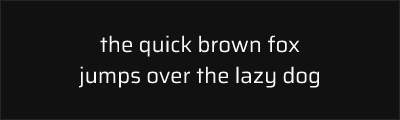
About Saira
- Source
- Google Fonts ↗
- Classification
- sans-serif
- Weights
- Variable (100-900)
- Features
- Variable, Italics
Saira is a sans-serif typeface designed by Héctor Gatti at Omnibus-Type and released through Google Fonts. The family includes multiple widths from condensed to expanded, making it exceptionally versatile for industrial, technical, and contemporary design applications where DIN-style aesthetics are desired.
History and Design
Héctor Gatti designed Saira as a comprehensive family addressing the need for a free industrial sans-serif with multiple width variations. The typeface draws inspiration from mid-20th-century industrial lettering and signage, featuring consistent stroke widths, geometric foundations, and excellent legibility at all sizes.
Saira's notable feature is its width variations, including Saira Extra Condensed, Saira Condensed, and Saira Semi Condensed, alongside the standard width. This makes it particularly useful for situations requiring space efficiency, similar to DIN's traditional applications.
Why Saira is Popular
Saira fills an important gap in free typography as a comprehensive industrial sans-serif with condensed widths. Its clean geometric forms and technical aesthetic make it popular for automotive, racing, technology, and industrial applications. The variable font version adds modern flexibility for responsive design.
Technical Features
- Variable font: Continuous weight and width axes for precise control
- Multiple widths: Extra Condensed, Condensed, Semi Condensed, and Regular
- Complete italic family: All weights and widths include italics
- OpenType features: Tabular figures, case-sensitive forms
Best Use Cases
Saira excels in:
- Automotive industry: Racing and performance vehicle branding
- Technical documentation: Clear, efficient text in manuals
- Signage: Condensed widths ideal for space-limited applications
- Industrial branding: Projects precision and engineering focus
Usage Tips
For narrow spaces, use Saira Condensed or Extra Condensed variants. The condensed widths work especially well for data tables and technical specifications where space is premium. Pair with neutral body fonts for contrast in complex layouts.
Alternative For (1)
Saira is a free alternative to the following premium fonts:
How to Use Saira
Copy these code snippets to quickly add Saira to your project.
CSS Import
@import url('https://fonts.googleapis.com/css2?family=Saira:wght@100..900&display=swap');HTML Link Tags
<link rel="preconnect" href="https://fonts.googleapis.com">
<link rel="preconnect" href="https://fonts.gstatic.com" crossorigin>
<link href="https://fonts.googleapis.com/css2?family=Saira:wght@100..900&display=swap" rel="stylesheet">
Tailwind CSS
// tailwind.config.js
module.exports = {
  theme: {
    extend: {
      fontFamily: {
        'saira': ['Saira', 'sans-serif'],
      },
    },
  },
}

// Usage in HTML:
// <p class="font-saira">Your text here</p>
React / Next.js
// Using next/font (Next.js 13+)
import { Saira } from 'next/font/google';

const saira = Saira({
  subsets: ['latin'],
  weight: ['100', '200', '300', '400', '500', '600', '700', '800', '900'],
});

export default function Component() {
  return (
    <p className={saira.className}>
      Your text here
    </p>
  );
}

// Or using inline styles with Google Fonts link:
// <p style={{ fontFamily: "'Saira'" }}>Your text</p>