Source Code Pro
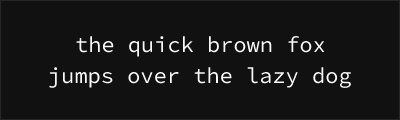
About Source Code Pro
- Source
- Google Fonts ↗
- Classification
- mono
- Weights
- Variable (100-900)
- Features
- Variable, Italics
Source Code Pro is a monospace font designed by Paul D. Hunt for Adobe, released in 2012 as the monospace member of the Source type family. It provides a professional, neutral coding font with excellent language support and true italic forms.
History and Design
Adobe commissioned Source Code Pro as part of their open-source Source font family, which also includes Source Sans Pro and Source Serif Pro. Paul D. Hunt designed it to complement these families while meeting the specific needs of coding environments. The font balances neutrality with subtle humanist touches.
Why Source Code Pro is Trusted
Source Code Pro has become a standard choice in professional environments:
- Adobe quality: Crafted by a major type foundry
- True italics: Genuine italic design, not sloped roman
- Family harmony: Pairs perfectly with Source Sans/Serif Pro
- Comprehensive support: Extensive language and weight coverage
- Variable font: Modern implementation with weight axis
Technical Features
- Weight range: 200-900 (Variable font with full range)
- True italics: Each weight has a companion italic
- Character set: Extended Latin, Cyrillic, Greek, Vietnamese
- OpenType features: Stylistic alternates, tabular figures
- Professional origin: Adobe foundry quality assurance
Best Use Cases
Source Code Pro excels in:
- Enterprise development: Professional, trusted appearance
- Documentation: Pairs beautifully with Source Sans Pro
- Multi-language projects: Extensive character support
- Adobe ecosystem: Native integration in Creative Cloud
Usage Tips
Use weight 400 for body code, 600 for emphasis. Enable italics for comments to leverage the true italic design. For a cohesive design system, pair with Source Sans Pro for UI and Source Serif Pro for long-form content. Available through Adobe Fonts for Creative Cloud subscribers or Google Fonts for everyone else.
Alternative For (3)
Source Code Pro is a free alternative to the following premium fonts:
How to Use Source Code Pro
Copy these code snippets to quickly add Source Code Pro to your project.
CSS Import
@import url('https://fonts.googleapis.com/css2?family=Source+Code+Pro:wght@100..900&display=swap');HTML Link Tags
<link rel="preconnect" href="https://fonts.googleapis.com">
<link rel="preconnect" href="https://fonts.gstatic.com" crossorigin>
<link href="https://fonts.googleapis.com/css2?family=Source+Code+Pro:wght@100..900&display=swap" rel="stylesheet">
Tailwind CSS
// tailwind.config.js
module.exports = {
  theme: {
    extend: {
      fontFamily: {
        'source-code-pro': ['"Source Code Pro"', 'sans-serif'],
      },
    },
  },
}

// Usage in HTML:
// <p class="font-source-code-pro">Your text here</p>
React / Next.js
// Using next/font (Next.js 13+)
import { Source_Code_Pro } from 'next/font/google';

const source_code_pro = Source_Code_Pro({
  subsets: ['latin'],
  weight: ['100', '200', '300', '400', '500', '600', '700', '800', '900'],
});

export default function Component() {
  return (
    <p className={source_code_pro.className}>
      Your text here
    </p>
  );
}

// Or using inline styles with Google Fonts link:
// <p style={{ fontFamily: '"Source Code Pro"' }}>Your text</p>