Victor Mono
About Victor Mono
- Source
- Google Fonts ↗
- Classification
- mono
- Weights
- Variable (100-900)
- Features
- Variable, Italics
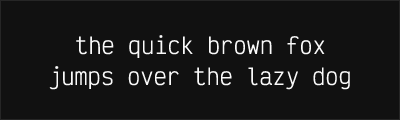
Victor Mono is a free programming font with semi-connected cursive italics and programming ligatures, designed by Rune Bjørnerås. It provides a free alternative to premium fonts like Operator Mono and Dank Mono for developers who want personality in their code.
History and Design
Rune Bjørnerås created Victor Mono to fill the gap for a free coding font with distinctive cursive italics. The design combines clean, geometric regular forms with flowing, semi-connected italic letterforms that add character to code comments and keywords without sacrificing readability.
Why Victor Mono is Special
Victor Mono delivers premium aesthetics at no cost:
- Cursive italics: Flowing letterforms that stand out in code
- Programming ligatures: Clean rendering of common operators
- Variable font: Continuous weight adjustment
- True alternative: Matches Operator Mono's appeal for free
- Active development: Regular updates and improvements
Technical Features
- Weight range: 100-700 (Variable font support)
- Cursive italics: Each weight has flowing italic variant
- Ligatures: Full set of programming ligatures
- Character variants: Multiple stylistic options available
- Good language support: Latin, Cyrillic, Vietnamese
Best Use Cases
Victor Mono excels in:
- Syntax-highlighted code: Italics make comments and keywords pop
- Live streaming: Distinctive look that stands out
- Personal projects: When you want personality in your tools
- Demonstrations: Code that looks interesting on screen
Usage Tips
Enable both ligatures and italics in your editor to get the full Victor Mono experience. Configure your theme to use italics for comments, keywords, and other semantic elements. Weight 400 for regular code, 500-600 for presentations. The cursive italics pair well with any sans-serif for UI text.
Alternative For (2)
Victor Mono is a free alternative to the following premium fonts:
Excellent free alternative with similar cursive italics and ligatures
How to Use Victor Mono
Copy these code snippets to quickly add Victor Mono to your project.
CSS Import
@import url('https://fonts.googleapis.com/css2?family=Victor+Mono:wght@100..900&display=swap');HTML Link Tags
<link rel="preconnect" href="https://fonts.googleapis.com">
<link rel="preconnect" href="https://fonts.gstatic.com" crossorigin>
<link href="https://fonts.googleapis.com/css2?family=Victor+Mono:wght@100..900&display=swap" rel="stylesheet">
Tailwind CSS
// tailwind.config.js
module.exports = {
  theme: {
    extend: {
      fontFamily: {
        'victor-mono': ['"Victor Mono"', 'sans-serif'],
      },
    },
  },
}

// Usage in HTML:
// <p class="font-victor-mono">Your text here</p>
React / Next.js
// Using next/font (Next.js 13+)
import { Victor_Mono } from 'next/font/google';

const victor_mono = Victor_Mono({
  subsets: ['latin'],
  weight: ['100', '200', '300', '400', '500', '600', '700', '800', '900'],
});

export default function Component() {
  return (
    <p className={victor_mono.className}>
      Your text here
    </p>
  );
}

// Or using inline styles with Google Fonts link:
// <p style={{ fontFamily: '"Victor Mono"' }}>Your text</p>